
Education Fee Panel For School Merchants
Designing Simplified & User Friendly Customer Lifecycle Management System For Merchants.
Problem Statement
Overview
At Paytm, the leading Indian e-commerce payment system and digital wallet company, which provides a very simplified payment gateway to different kind of online use-cases, eventually by including education payments as well in the system it was noticed that after having 5k merchants onboard there were quite a good number of transactions happening but the merchant did not have control over there own fee system which made us lead to a major requirement of their own simplified management system.
The task was to find a way where the merchants could upload all their student data on the system directly instead of having excel sheets and could keep track of all the fees at every level, which could reduce the manual effort of contacting Paytm and getting all the fee track over calls and also which would motivate more merchants to use the platform effortlessly.
To summarise
the Idea was too create a Functional Education Fee Web Panel with emotional connect with merchants.
The Role
I teamed up with another product designer on this large-scale project. My role focused on two main areas:
-
Research & Documentation: I conducted secondary research to map out the user’s environment, requirements, and expectations.
-
Wireframing & Strategy: I designed the wireframes to showcase the application's interactive features, creating a solution that balanced business and technical goals while keeping things effortless for the end user.
The
Challenge

Understanding the Merchant's Needs
Creating a massive dashboard comes with its own unique set of challenges. To tackle this, we deeply analyzed the product and spoke directly with numerous merchants to understand exactly what they expected from the panel.
Prioritizing Productivity and Usability
Our major challenge was designing an effective solution centered around productivity, as large educational organizations require sophisticated tools to streamline employee workflows. Because the software needs to be easily adopted by every worker to organize their tasks efficiently, we prioritized extreme usability at every stage, ensuring the final interface is practically foolproof.
Driving Efficiency Through an MVP
Ultimately, to balance these complex requirements with a timely delivery, we chose to launch the panel using an MVP (Minimum Viable Product) approach. This allowed us to roll out core functionalities efficiently while leaving room for iterative improvements.
Research and Interview

We interviewed few Merchants who were using Paytm payment gateways for the fee collection at their organisation and tried to understand their day to day data entry in regards of fees being collected, we tried to gather out all the possible features that were to be in the Interface, below were the few elements that were to be developed and introduced in the Phase 1 of our MVP product.
Our
Findings
Need One
Need Two
Need Three
Need Four
General intro of the panel with an on-boarding.
A list of fee received and forms received.
Student data managing systems.
A file centre where all the information of uploads and downloads is available.
Brainstorming
I usually start my design process with iterating through many ideas on paper and having a brainstorming sessions with the team and stakeholders.
Wire-framing on paper is a quick and efficient way to layout all thoughts and finalise the information

Note: above I have only shown the major screens of this whole process.
Findings
What was I able to determine?
Language and communication during on-boarding are crucial
With that out on the list, we started making rough sketches and quickly on-boarded them onto sketch for visuals since there was a time crunch. Below were the proposed MVP solution architecture.
User must always be aware of system status
User must be able to seek help contextually with ease.
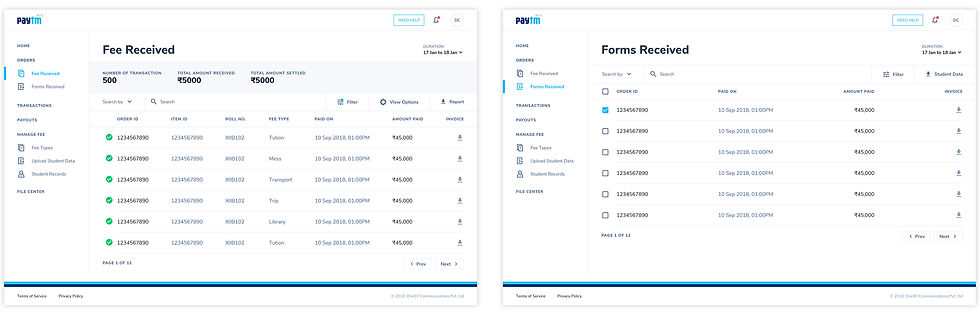
Orders: Fee Received & Forms Received
The order section had two major bifurcation of fee received and forms received where all the information of the students Fees and their forms breakup and the submission of the fees for a particular fee type were mentioned, by this it was easier for the school admin to track all the fees at one go.
Note: above I have only shown the major screens of this whole process.
Fee Type
This sections allowed the merchants to configure all kind of fee types, their Status, their attributes and their breakups for certain groups of students on the basis of their class standard.

Note: above I have only shown the major screens of this whole process.
Upload Student Data
One of the major requirement of the merchants were to upload all the student data at one place instead of having it on the excel sheets which was quite a tedious task for them.

Note: above I have only shown the major screens of this whole process.
Student Records
Here we provided a fee records section of every student separately and the history of it.

Note: above I have only shown the major screens of this whole process.
File Center
File Center was a section where all the history of downloads and uploads of the whole panel were available for admins to track the activity on the daily basis.

Note: above I have only shown the major screens of this whole process.
70
Screens
12
Iterations
16
Weeks
+22K
Users
Facts & Figures
Our numbers speak for themselves
What did I learn from this project?
This was the first project where I worked on as the lead UX designer and I got to interview the real time user of a product. It did strengthen my skills in not only UX design but also in Leadership and Time Management.
Key
Highlights
Designing the straightforward, easy flows are often the hardest.
I do wish we could've conducted an in depth testing to evaluate how effective the new designs were.
Users are exposed to a lot more than we can imagine, hence talking to them and understanding their mind (irrespective of the design being created) is very helpful
Keeping business goals in mind is may cause a compromise in the user experience, however good designs always find a balance.
Organising my work to deliver designs within the desired timeline